
Product Web-based AI Catalog + AI Platform Features
Roles UX/UI Designer
Roles UX/UI Designer
Timeline AI Catalog - 3 Months design to development
Industry Design/Image Production, Real Estate and Construction.
Industry Design/Image Production, Real Estate and Construction.
Bella AI Catalog extends the Bella ecosystem into an intelligent creative layer — integrating AI-powered tools directly into the workflow to help real estate professionals create, enhance, and communicate listing content faster and more consistently.
A suite of eight AI tools designed to feel invisible yet indispensable, turning Bella into an end-to-end creative companion where technology amplifies human intuition rather than replacing it.
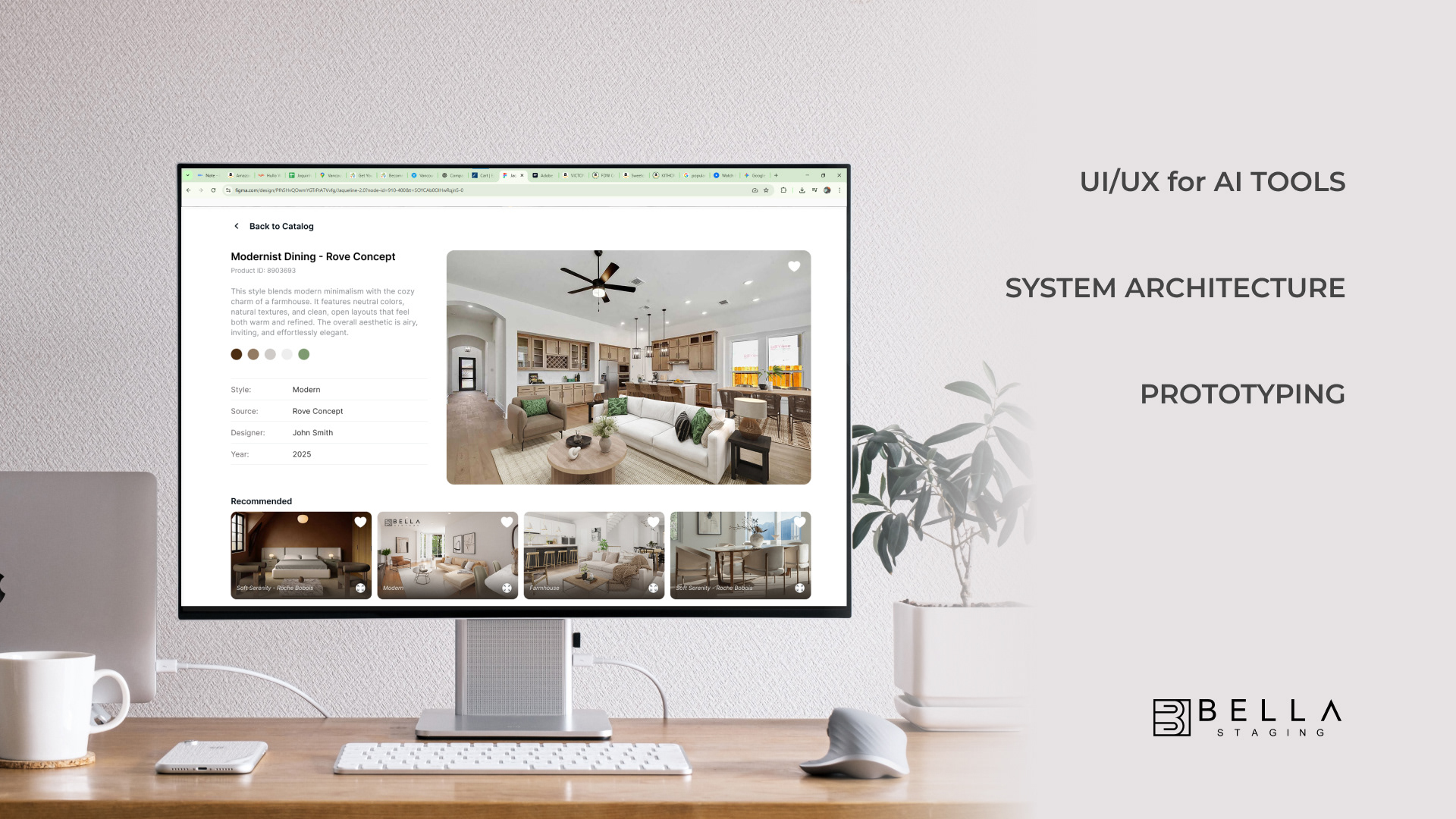
Bella AI Context & Background
Following the success of the Bella Catalog and Bella Platform, which redefined how real estate professionals curate and present their listings, the next challenge was clear: the platform needed to move beyond workflow optimization and into intelligent content creation.
Realtors and designers were still spending hours outside the platform on tasks like writing listing copy, enhancing photos, and preparing follow-up communications. The opportunity was to bring those actions inside Bella — powered by AI — without disrupting the experience users already trusted.
I led the design of the AI Catalog and its suite of tools, shaping how machine learning capabilities could be introduced into a product that already had established design language, workflows, and user expectations.
AI tools for realtors
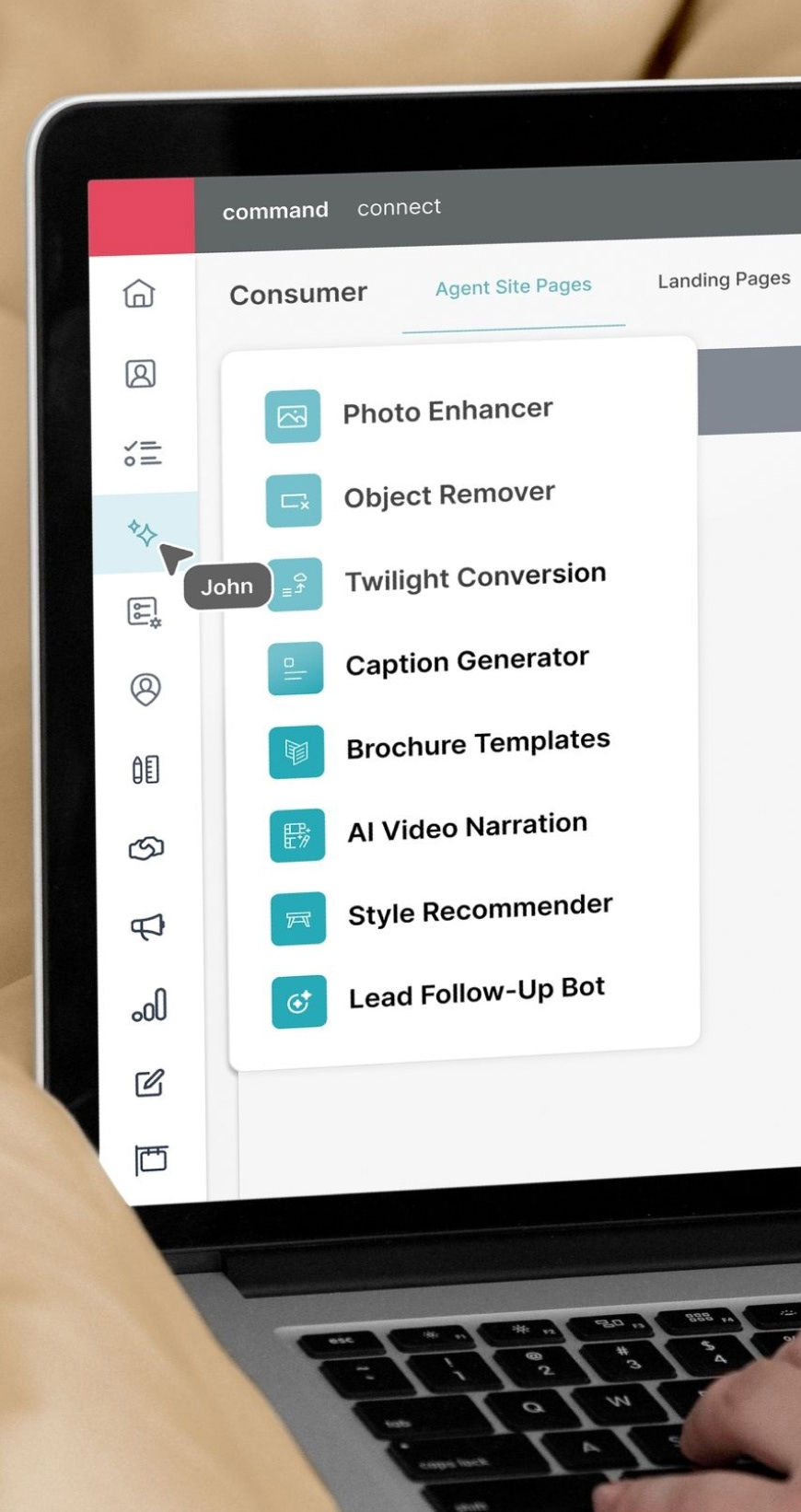
Eight tools were designed to cover the full content lifecycle of a listing — from visuals to copy to client communication:
Photo Enhancer — Automatically corrects lighting, tone, and detail in listing photos.
Object Remover — Removes unwanted elements cleanly without manual masking.
Caption Generator — Produces listing descriptions tailored to room type and style.
Brochure Templates — Generates ready-to-use marketing collateral from listing data.
AI Video Narration — Creates narrated video walkthroughs from static photo sets. Style
Lead Follow-Up Bot — Drafts personalized client follow-up messages based on project history.
Recommender — Suggests curated staging styles based on room detection and user preferences.
Twilight Conversion — Transforms daytime exteriors into dusk lighting for high-impact listing images.
These tools were created to make AI feel invisible yet indispensable. Together, they turn the Bella ecosystem into an end-to-end creative companion, where technology amplifies human intuition rather than replacing it.
Challenges Designing AI & Conversational UI
Tone and Personality – Finding the right voice: professional enough for real estate, yet warm and human to build trust.
Visual Clarity – Designing structured layouts for unstructured dialogue, using spacing, highlights, and micro-interactions to guide attention.
Error Handling – Anticipating confusion and crafting empathetic fallback responses that recover the flow naturally.
Transparency and Trust – Showing users what data is used and confirming each action to build confidence in the AI.
Consistency with Brand UI – Aligning conversational rhythm, typography, and motion with Bella’s existing design language for a seamless experience.
The central design challenge
Introduce AI capabilities that feel natural and trustworthy — without adding complexity or breaking the design consistency users already relied on.
Users & Pain Points
Three users, three friction points — all surfaced through direct participation in operations, workflow observation, and ongoing feedback cycles.
Real Estate Agents & Homeowners Spending time outside the platform on repetitive creative tasks — writing captions, enhancing photos, drafting follow-up messages — with no unified tool to support them.
Designers & 3D Artists Working with inconsistent briefs and limited references, needing smarter filtering and catalog browsing to align with client expectations faster.
Operations Managers Overseeing quality control across hundreds of AI-generated outputs with no centralized review workflow or structured approval process.
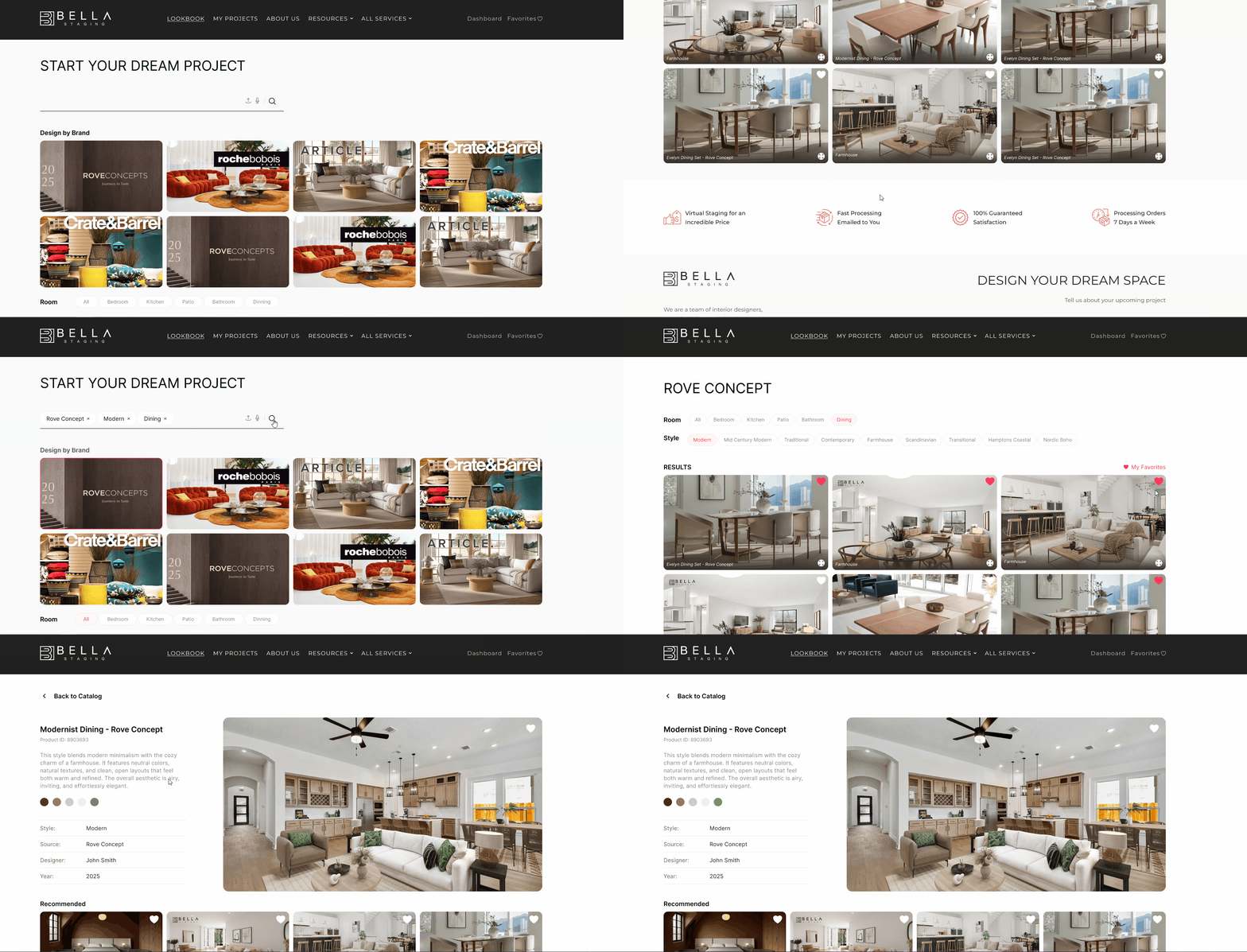
AI BRANDED FURNITURE CATALOG
BROWSING TO ROOM SET PROFILE
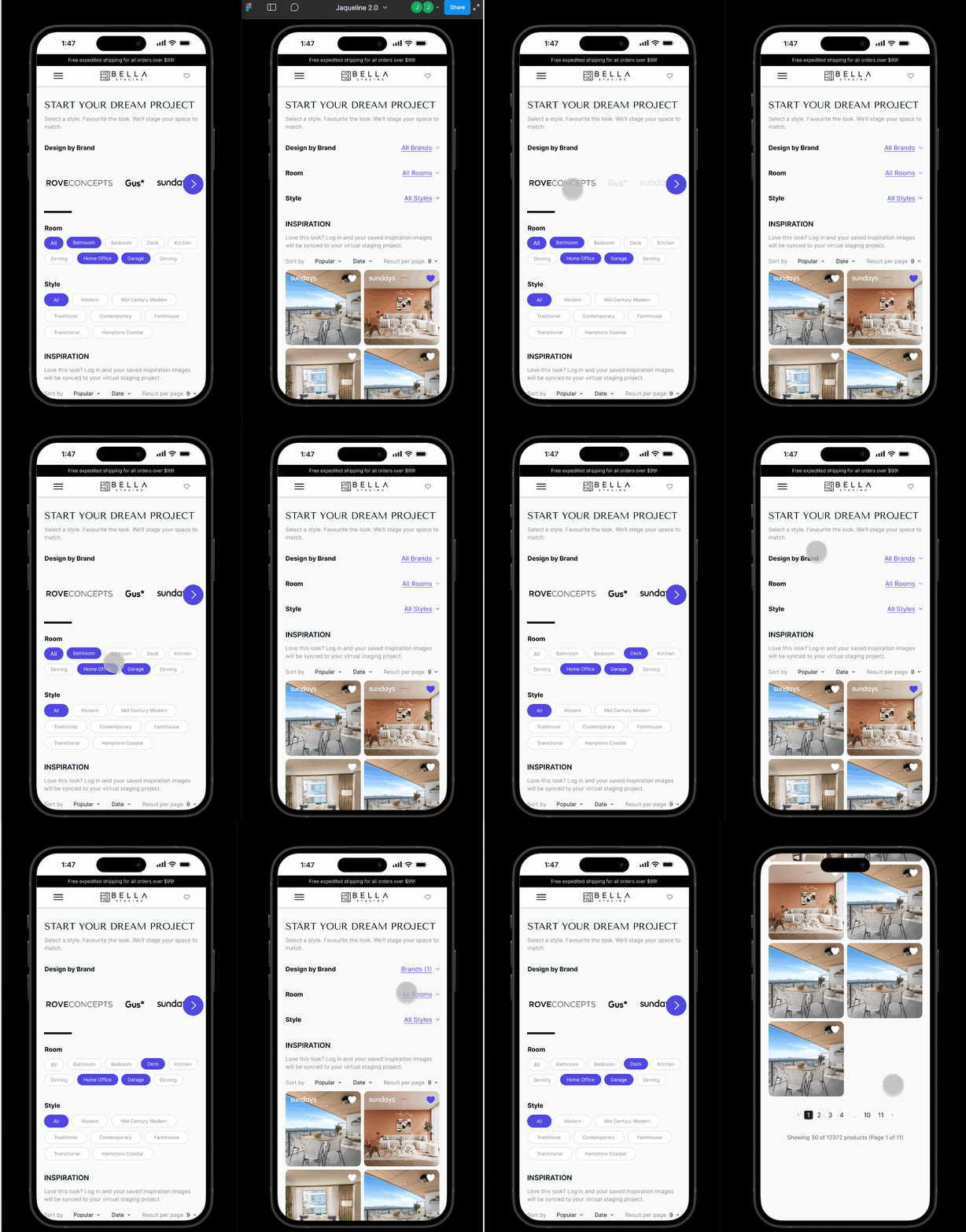
AI Branded Catalog, Saving Reference to start a Staging Project
Goals & Success Metrics
The goal was to make AI feel like an organic extension of the platform — not a separate feature bolted on. Each tool had to reduce effort, not create new learning curves. The guiding design principle throughout: AI should amplify, not replace — designing tools that support human decision-making rather than automate it away.
User Goals (client)
- Generate and enhance listing content without leaving the platform.
- Discover and save style references with confidence.
- Communicate listing needs faster using intelligent prompts.
Business Goals (ops and product)
- Reduce content creation time per listing.
- Increase platform stickiness and session depth.
- Position Bella as an end-to-end creative platform, not just a staging tool.
My Role & Decision Scope
I worked with another designer on the end-to-end cycle, from defining the AI tool strategy to designing conversational UI flows and aligning with development across four years of iterative phases.
- AI product strategy and tool definition.
- UX/UI design for conversational and catalog interfaces
- Brand and visual direction
- Design handoff — adapting to Figma annotation, Jira specs, and QA review depending on the developer's workflow
- Stakeholder alignment across product, operations, and engineering
*Through out 4 years project, I adjusted the design handoff according to the process that developers adapt better and our management source status.
Some of them prefer annotation on Figma, some others don't like Figma and I place the annotation with screenshot(sometimes video or gif to show the interaction/reproduce error) and specs on Jira card reinforcing the specs for UI details that I caught on QA phases.
Some of them prefer annotation on Figma, some others don't like Figma and I place the annotation with screenshot(sometimes video or gif to show the interaction/reproduce error) and specs on Jira card reinforcing the specs for UI details that I caught on QA phases.
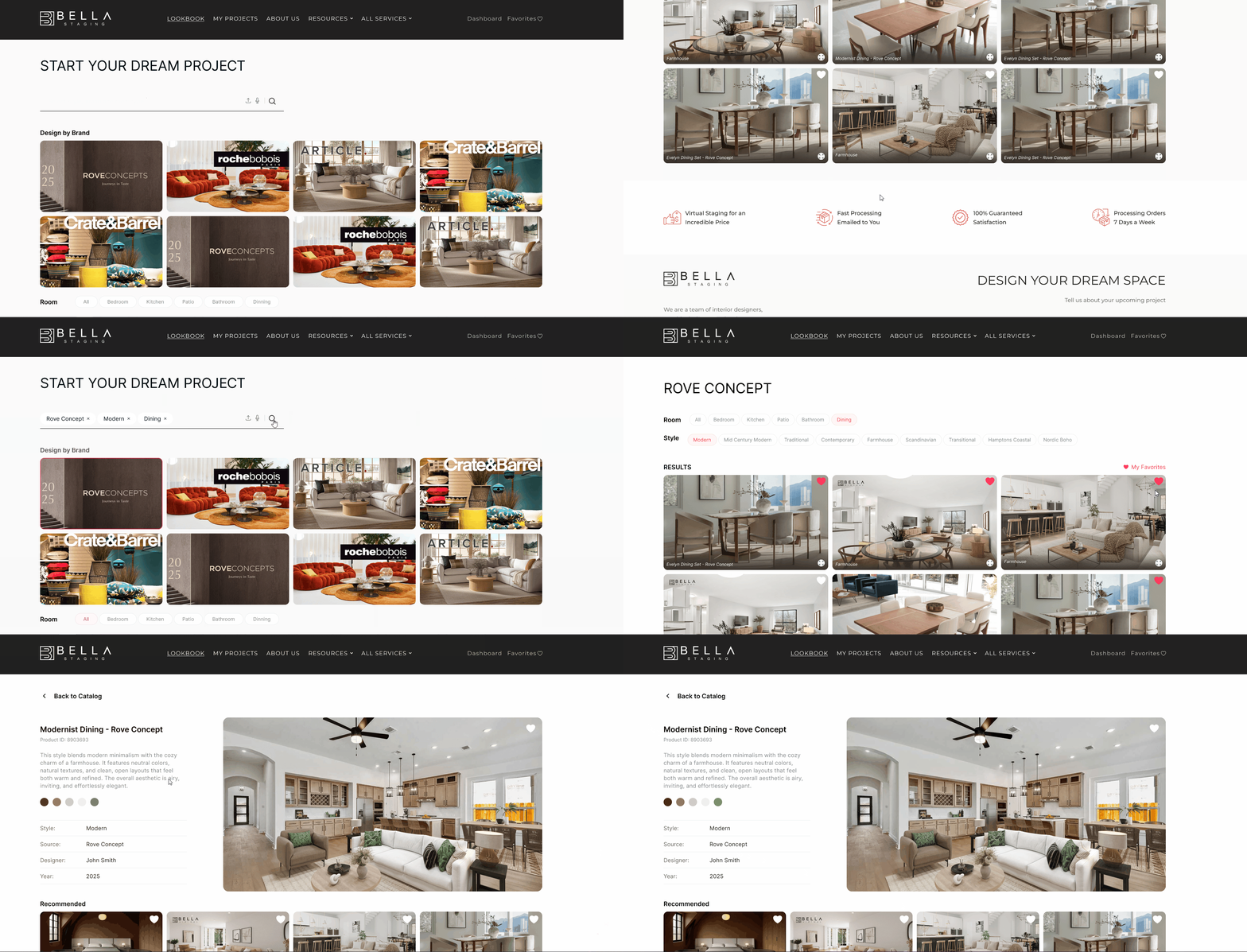
DESIGN HANDOFF TYPE ONE - USEFLOW WITH WIREFRAMES AND ANNOTATION FOR DEV
ORDERING VIRTUAL STAGING THROUG BRAND CATALOG

Research & Discovery
Research was grounded in direct observation and continuous feedback from real estate agents, staging professionals, and internal production teams.
Key insights included:
- Users were comfortable with AI assistance but needed transparency — they wanted to see what data was being used and confirm each action before it executed.
- Trust was built through tone, not just accuracy — the voice of the AI tools needed to feel warm and professional, not cold or transactional.
- Catalog browsing broke down when results felt generic — personalized filtering and room-based recommendations were essential.
These insights shaped both the tool prioritization and the conversational UI design decisions.
Design Under Constraints — Validating What Matters
Challenges & Constraints
- Introducing AI without disrupting an established, trusted user experience
- Managing limited development resources across a long iterative timeline
- Designing for both first-time users and power users with very different expectations
- Adapting to shifting business priorities and evolving AI capabilities
- Maintaining brand consistency while designing for novel interaction patterns
Validation & Results
Post-launch observations showed faster content creation, more consistent listing quality, and reduced time spent outside the platform on repetitive tasks. Qualitative feedback highlighted the tools' ease of use and the confidence users gained from having creative support built directly into their workflow.
What I'd Do Differently
Given more time and resources, I would have invested in deeper personalization for returning users, introduced performance dashboards so clients could track content engagement, and prioritized accessibility and localization earlier. I'd also build in more structured onboarding for the AI tools to reduce the learning curve for less technical users.
Lessons Learned & Takeaways
Designing AI tools within an established product taught me that trust is the hardest thing to design for — and the most important. Users don't resist AI because it's complex; they resist it when it feels unpredictable or opaque. Every design decision in this project came back to one question: does this make the user feel in control?
I also learned that design handoff is never one-size-fits-all. Across four years and multiple developers, I adapted between Figma annotations, Jira-based specs with screenshots, and recorded interactions — whatever helped the team ship accurately and efficiently.


