
A scalable virtual staging platform, with dedicated interfaces — a client portal, designer workspace, and admin CRM — designed to reduce turnaround time, simplify ordering, and support both high-volume professionals and detail-oriented final clients.
Product Web-based SaaS Platform
Roles Product Manager, UX/UI Designer, Art Director
Roles Product Manager, UX/UI Designer, Art Director
Timeline Concept to launch over 4 years (iterative phases)
Industry Design/Image Production, Real Estate and Construction.
Industry Design/Image Production, Real Estate and Construction.

Bella Context & Background
In real estate, presentation is everything — but traditional staging is slow, expensive, and hard to scale. Virtual staging solved the visual problem, but created a new one: most tools either delivered stunning results with chaotic workflows, or streamlined operations with poor design quality.
Bella Virtual Staging was founded in 2018 to help realtors get that first click on listings. By 2021, the business was processing 40,000+ images per year across North America, contributing to over $2 billion in real estate sold — all managed through Gmail, Excel, and Dropbox. As demand grew, the manual workflow became the bottleneck.
Hired as UX/UI Designer after graduating from Langara College, I helped shape a platform that transforms how clients, designers, and operations teams collaborate — turning a fragmented, high-volume process into a seamless, scalable experience.
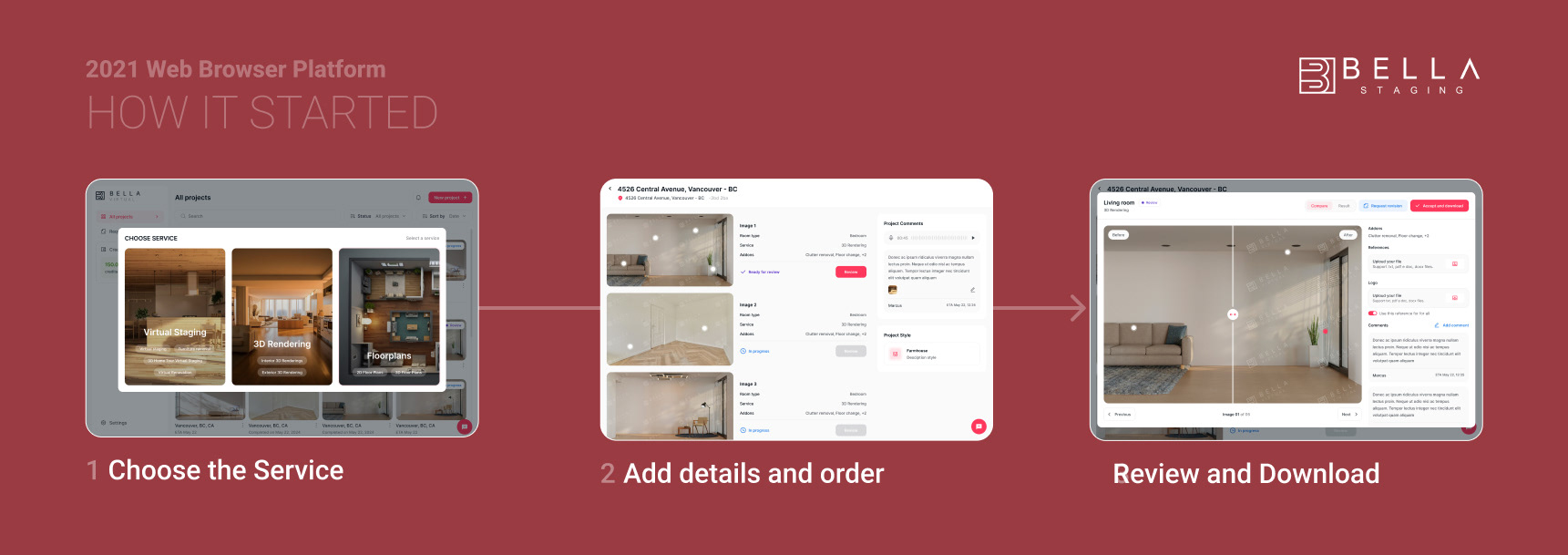
Bella Staging Web Platform - Client Interface 2021
Users & Pain Points
Three users, three friction points: all discovered through interviews, workflow analysis, and direct participation in the operations process.
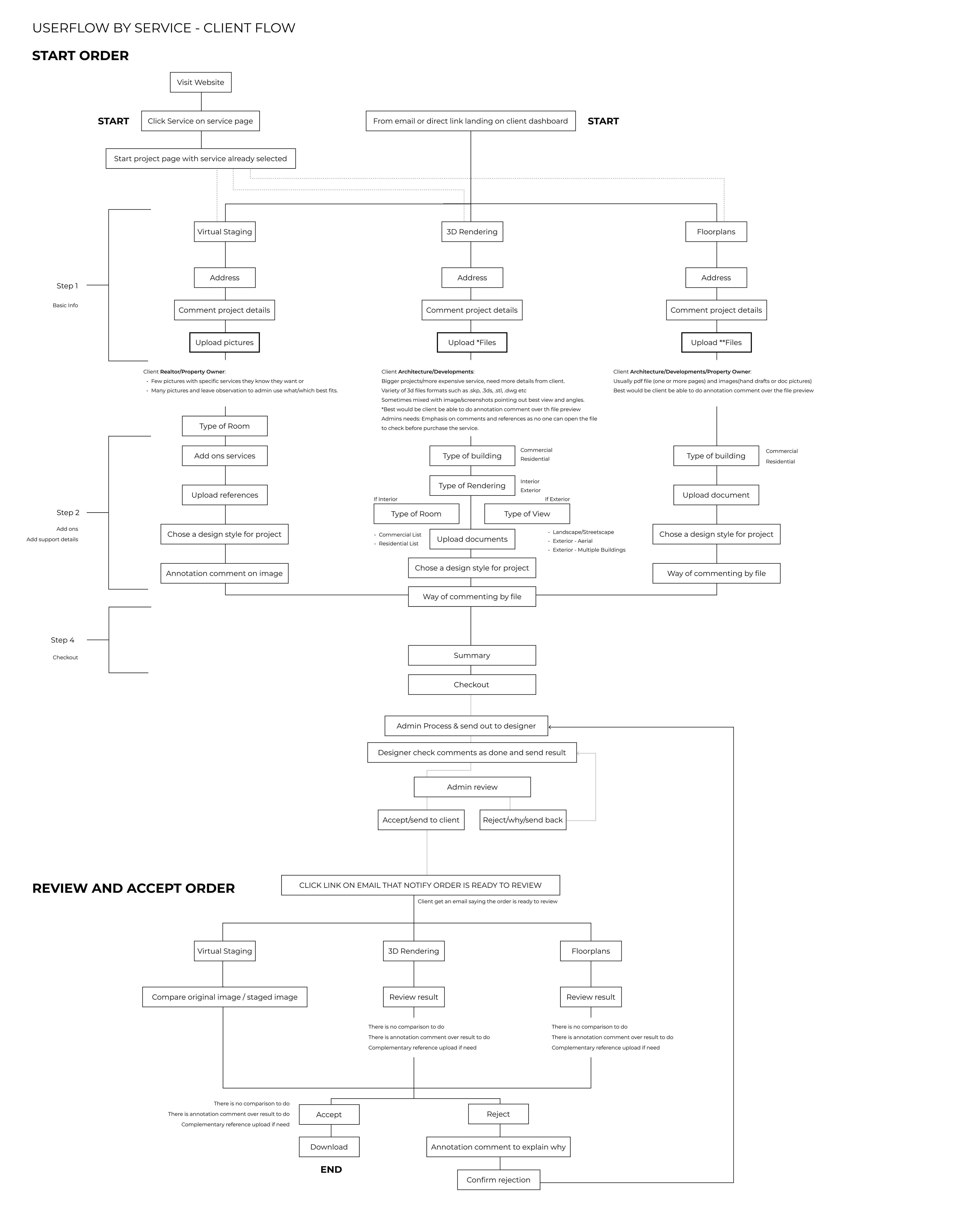
Operations Managers Coordinating 40,000+ orders annually with no centralized system: Managing files through Dropbox, tracking revisions on Excel, and communicating with global designers over Gmail.
Real Estate Agents & Homeowners Non-technical clients who knew exactly what they wanted but had no structured way to express it — resorting to handmade drawings, collages, screenshots, and PDFs to communicate revision requests.
Designers & 3D Artists Working across time zones with inconsistent, detail-heavy briefs that varied with every order — no standardized format, no shared language.
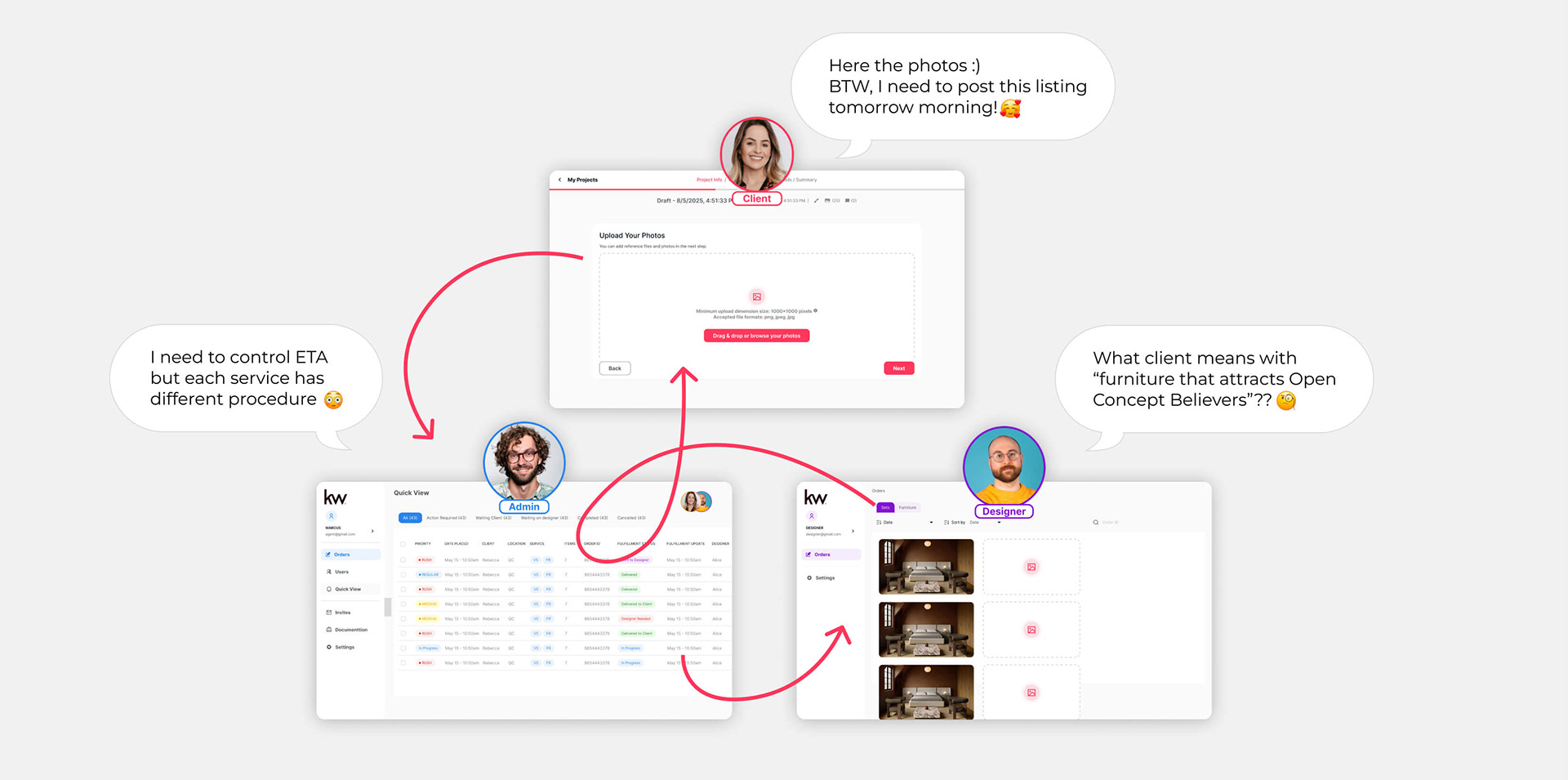
The central design challenge
Balance the level of detail operations needed to deliver fast, accurate results
— without overwhelming clients with too many inputs at checkout.
Goals & Success Metrics
The goal was to simplify without reducing control — letting the interface guide users through structure, not instructions.
The guiding design principle throughout: structure over instructions — designing flows that feel intuitive from the first order, without relying on onboarding text or tooltips to explain what to do next.
User Goals (client)
- Order virtual staging quickly and confidently.
- Communicate preferences and revisions clearly.
- Receive consistent, high-quality results every time.
Business Goals (ops and designer)
- Reduce operational friction and manual coordination.
- Support scalable growth across individual agents and large brokerages.
- Build trust that drives repeat usage.
My Role & Decision Scope
I led the product end-to-end and worked closely with developers and production team, translating real business needs into usable, scalable product solutions.
- Product strategy and roadmap definition
- UX/UI design and interaction decisions
- Brand and visual direction
- Operational workflow design
- Stakeholder alignment and decision-making
- UX/UI design and interaction decisions
- Brand and visual direction
- Operational workflow design
- Stakeholder alignment and decision-making
design process
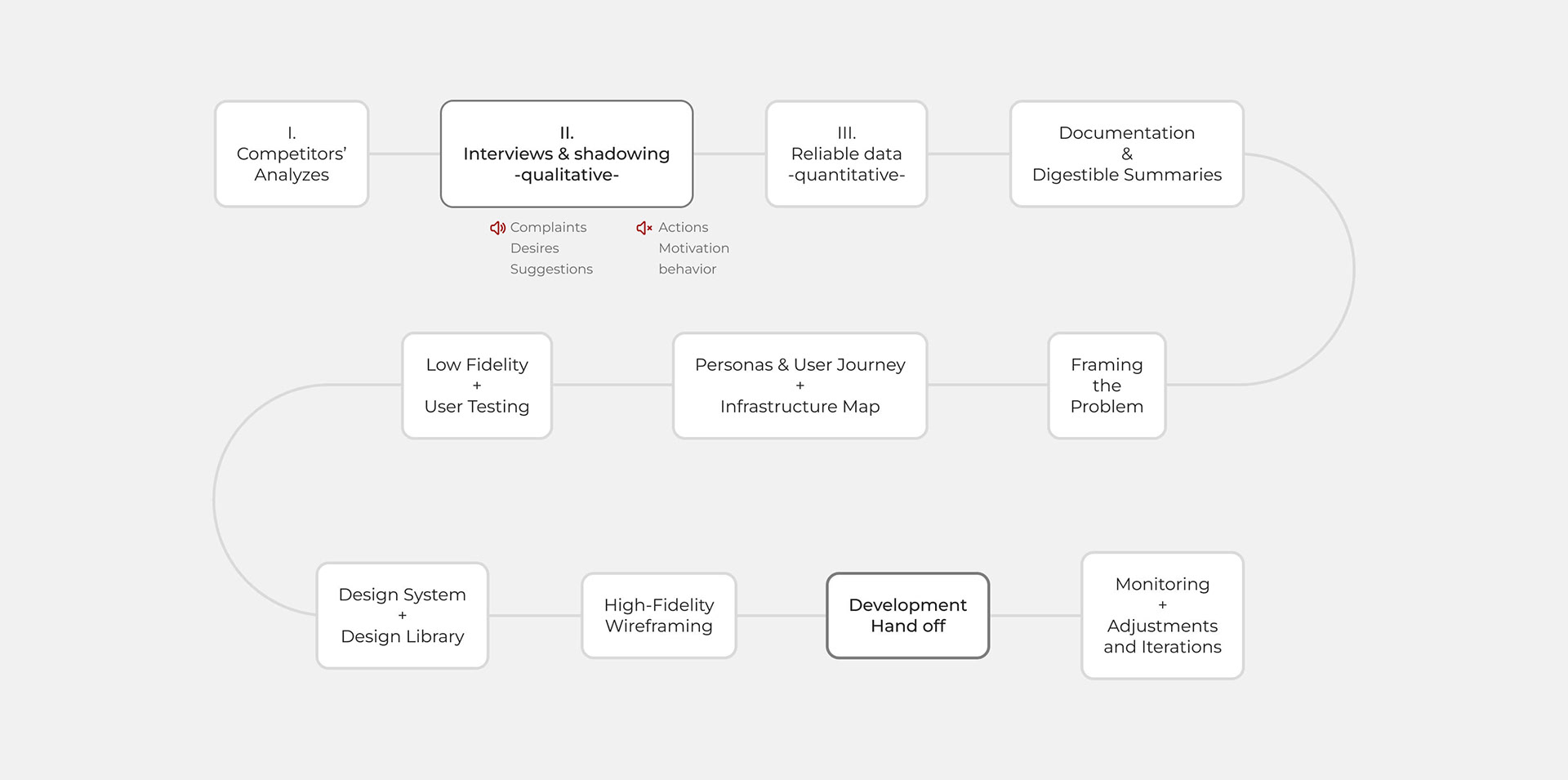
Research & Discovery
Research was grounded in direct experience and continuous feedback from:
- Real estate agents
- Brokers and staging professionals
- Internal production teams
- Brokers and staging professionals
- Internal production teams
Key insights included:
- Users valued clarity over customization at early stages
- Most errors came from unclear requirements, not poor visuals
- Speed and predictability were as important as aesthetic quality
- Most errors came from unclear requirements, not poor visuals
- Speed and predictability were as important as aesthetic quality
These insights shaped both feature prioritization and UX decisions.

Exploration & Iteration
Early versions explored multiple flows for:
- Order creation
- Style selection
- Revision requests
- Style selection
- Revision requests
Several ideas were discarded after testing revealed they increased cognitive load or slowed production. Iteration focused on removing friction, tightening language, and aligning user expectations with realistic delivery outcomes.

THE BUSINESS OPERATIONAL PROCESS - WORKFLOW
Strategy & Approach
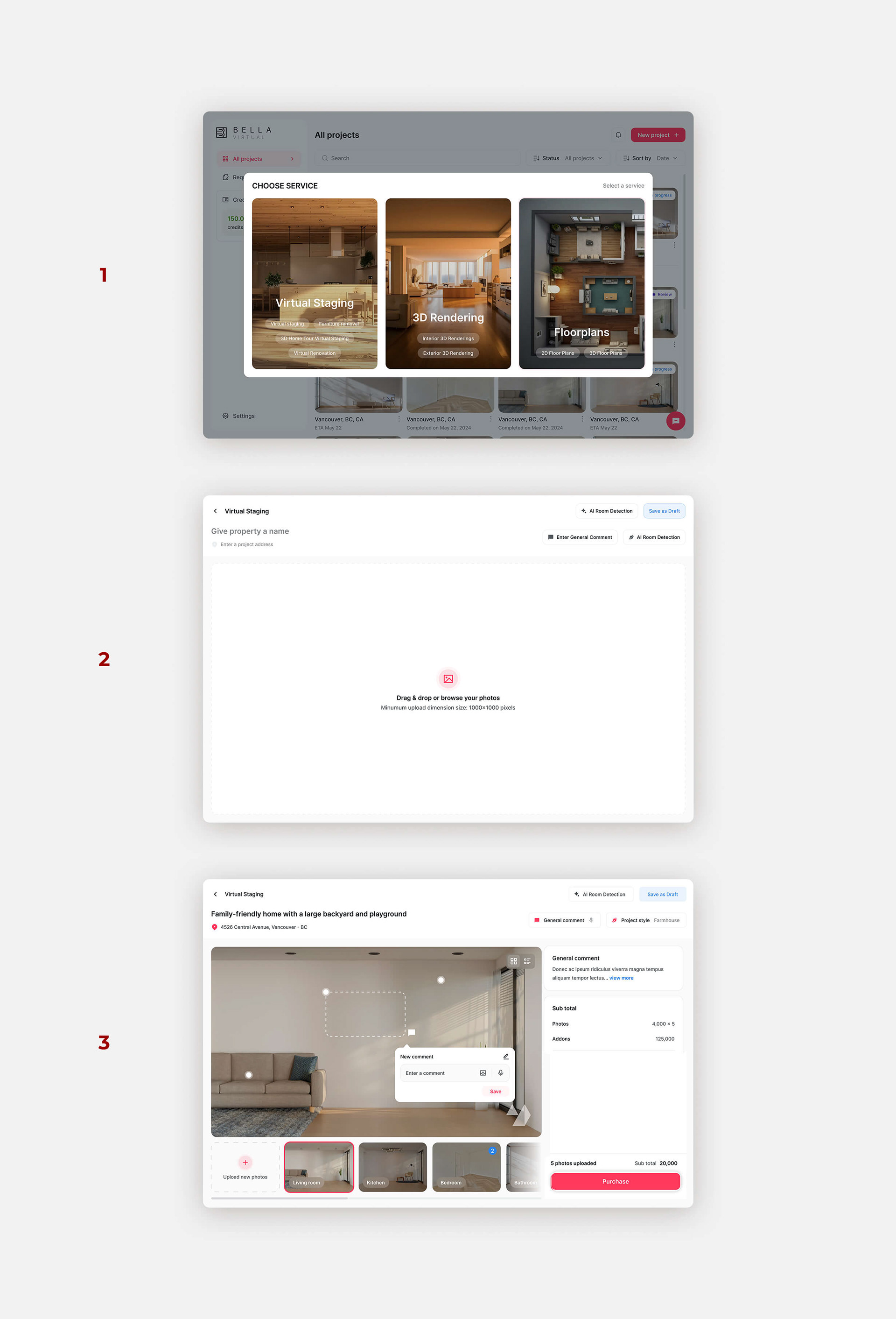
1- Choose the image editing service
The MVP launched with Virtual Staging and Image Editing, though I also designed flows for Virtual Renovation and 3D Rendering — services that require more detailed spec inputs and customized interior design requirements rather than simple image annotation.
2- Upload the images to be edited
Users can upload multiple images at once. AI-powered room detection automatically identifies and labels each space (living room, bedroom, kitchen, etc.), then suggests curated design styles based on the detected room type, with support for open-concept layouts.
3 – Add Style, Comments, and Submit
Users select styles from a catalog, add general project comments, and upload visual references. Per image, they can annotate specific details, attach references, and select optional paid add-ons — enabling highly customized requirements for each photo while keeping the experience intuitive and discoverable.
Design Under Constraints — Validating What Matters
Challenges & Constraints
- Balancing creative flexibility with production efficiency
- Managing limited development resources
- Educating users without adding friction
- Designing for both first-time and power users
- Adapting to changing business priorities and market timing
- Managing limited development resources
- Educating users without adding friction
- Designing for both first-time and power users
- Adapting to changing business priorities and market timing
Validation & Results
Post-launch observations showed faster order completion, clearer client requests, and reduced internal clarification loops. While quantitative metrics were limited in the early stages, qualitative feedback consistently highlighted the platform's ease of use, reliability, and the confidence it gave users to manage complex virtual staging projects.
What I’d Do Differently
Given more time and resources, I would have invested in deeper onboarding personalization for new users, introduced analytics dashboards to give clients clearer project insights, and prioritized accessibility and localization features earlier in the process. I'd also build in more proactive communication touchpoints to better support evolving client requirements throughout the workflow.
conclusion: Lessons Learned & Takeaways
Bella Virtual Staging has been both an ongoing project and a formative experience in UI/UX, product development, and cross-functional collaboration. Working closely with developers and mentors in product design best practices, I learned to:
- Navigate ambiguity and manage changing requirements.
- Balance user needs with business priorities.
- Collaborate effectively across design, development, and administrative teams.
- Balance user needs with business priorities.
- Collaborate effectively across design, development, and administrative teams.
The project reached the stage of an almost-ready MVP, though its official launch was postponed due to strategic timing and market decisions. Through this journey, I reinforced the belief that great products are built at the intersection of clarity, empathy, and execution, and that adaptability and communication are as critical as design skill.
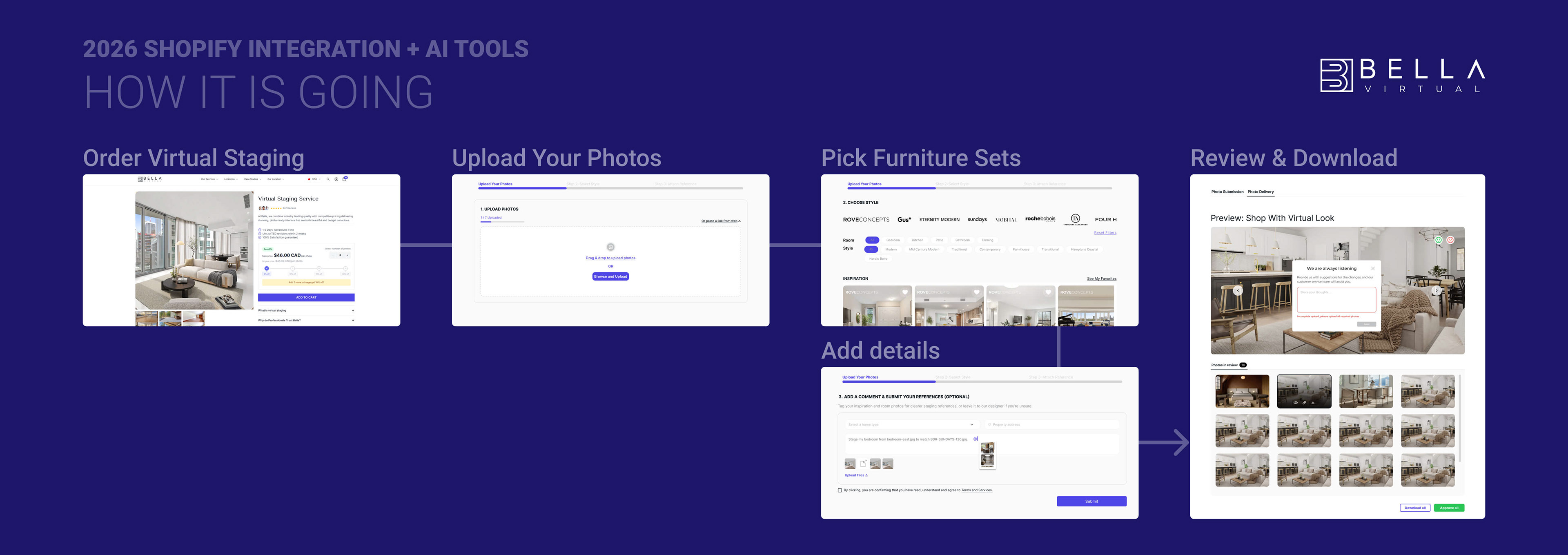
Next Steps
Bella Virtual Staging continues to evolve. The foundation was intentionally designed to be flexible, supporting future growth and enhancements without compromising usability or the brand’s integrity. Future iterations will focus on deepening user insights, expanding accessibility, and scaling operations efficiently.
art direction and design for marketing team
Marketing & Print
- Brochure templates
- Listing flyers
- Magazine ads
- Bi-fold LOB materials
- Branded PowerPoint deck (buyer segments)
- Brand & Identity
- Logo and brand guidelines
- Typography and color system
- AI tool suite branding
- Listing flyers
- Magazine ads
- Bi-fold LOB materials
- Branded PowerPoint deck (buyer segments)
- Brand & Identity
- Logo and brand guidelines
- Typography and color system
- AI tool suite branding
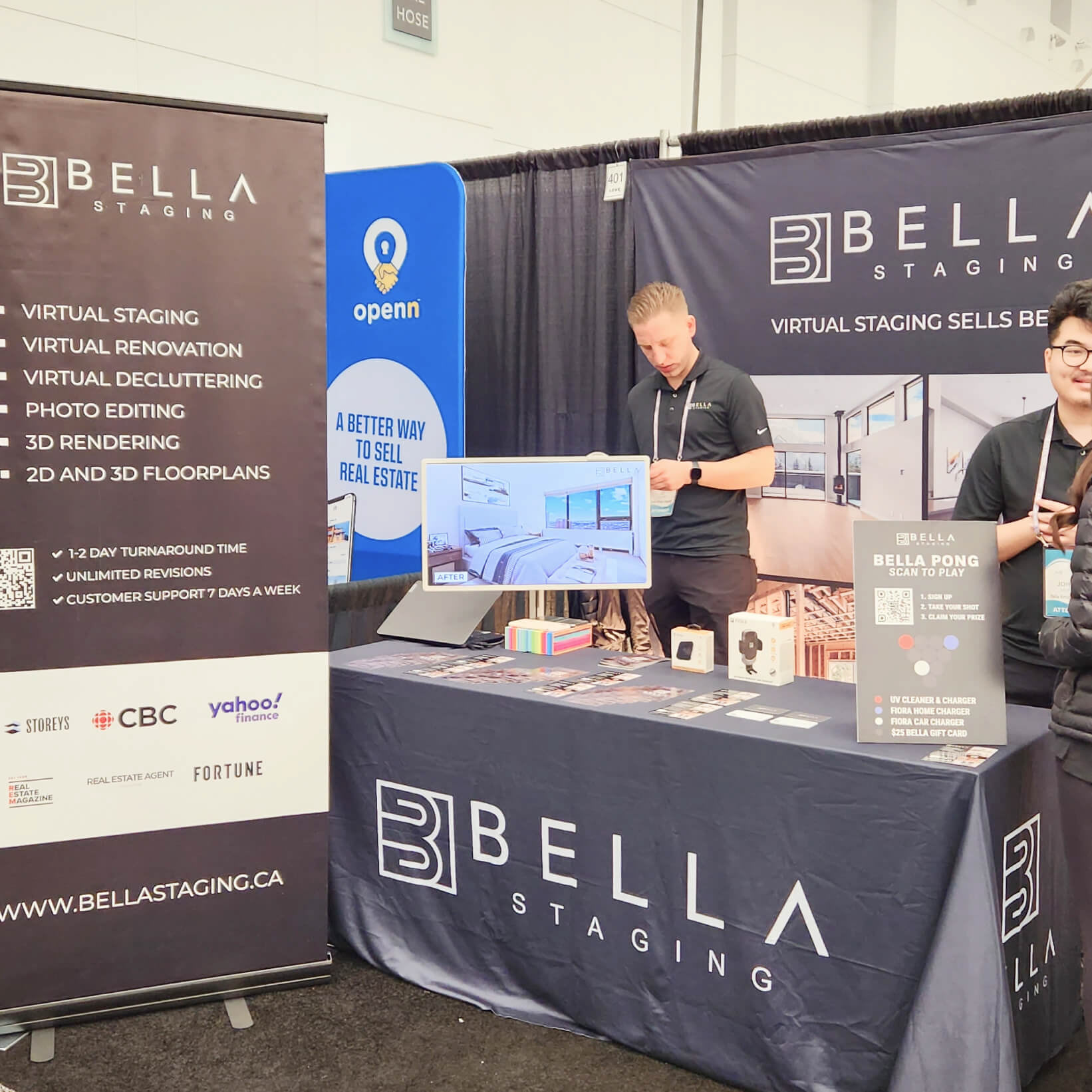
Events & Merchandise
- T-shirts / uniforms
- Event backdrops / step-and-repeat banners
- Signage
- Operations & Internal
- AI chatbot knowledge base layout (186 Q&As)
- QA review templates
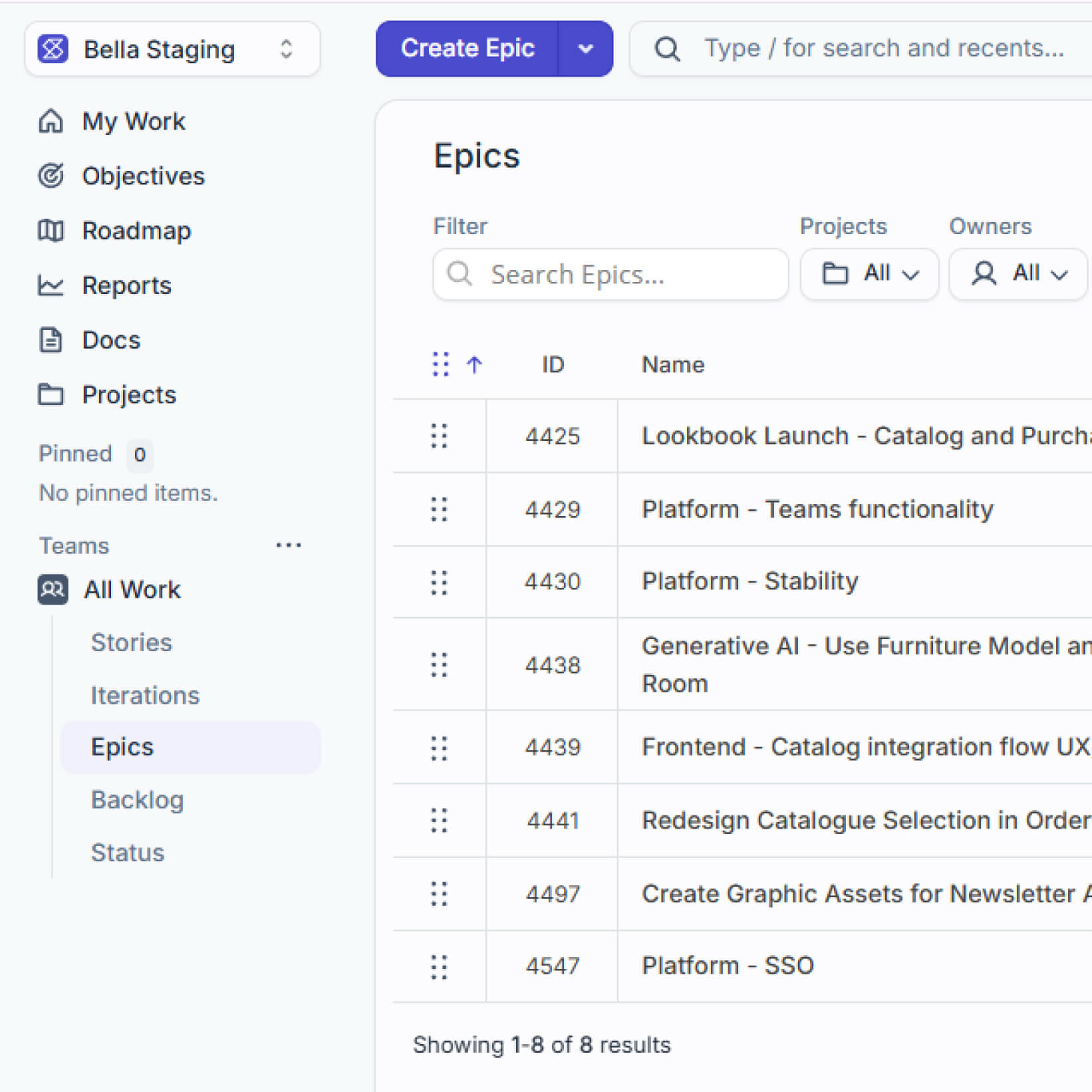
- Design handoff documentation (Figma, Jira)
- SEO blog content
- Event backdrops / step-and-repeat banners
- Signage
- Operations & Internal
- AI chatbot knowledge base layout (186 Q&As)
- QA review templates
- Design handoff documentation (Figma, Jira)
- SEO blog content
Digital / Web
- Website (Shopify website management and content management)
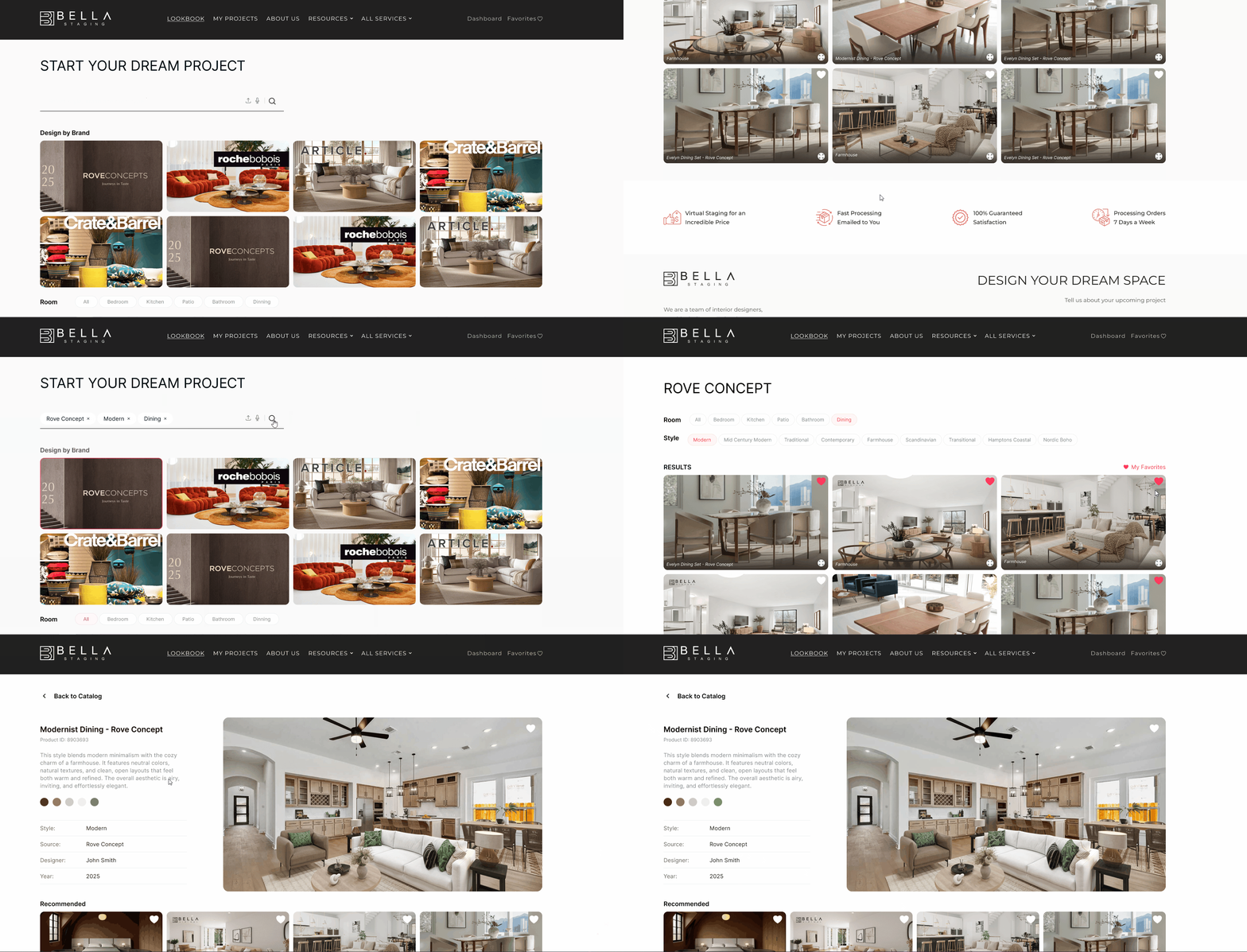
- AI Catalog interface
- Email templates for Newsletter
- Social media assets (Instagram captions + posts)
- AI Catalog interface
- Email templates for Newsletter
- Social media assets (Instagram captions + posts)


